CTR Campaign Pricing for GA4-Friendly Geo-Targeting: What It Costs
You pick a city, set a daily visit count, and then have to guess what the campaign will burn through. Geo-targeted CTR campaigns are priced in credits, and the credit math decides whether your budget covers a week or a quarter.
This article breaks down CTRTool's Starter, Growth and Scale plans, shows what 2,000 credits buys in Desktop versus Mobile visits, and explains why the pricing structure fits GA4 reporting. You will finish knowing which plan matches your targeting scope and where credits get consumed.
What Is CTRTool and How Does Its Geo-Targeting Work?
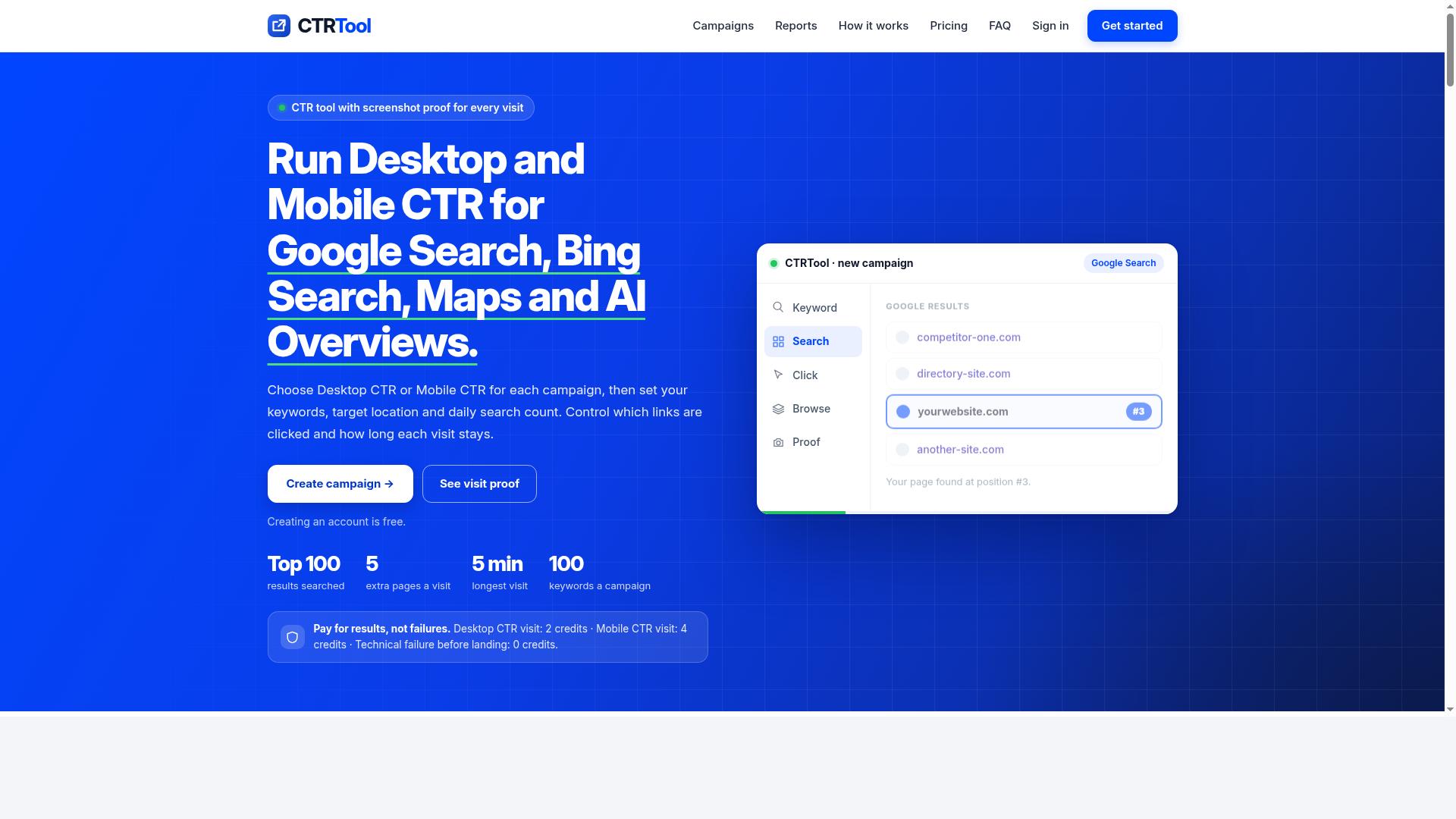
CTRTool is a CTR campaign tool that runs Desktop and Mobile click-through campaigns on Google Search, Bing Search, Google Maps, and AI Overviews, with every visit documented by screenshot proof. It is a SaaS platform built for SEO practitioners and agencies who want controlled, trackable visits rather than guesswork.
Geo-targeting is configured at the campaign level. Users pick a country and, optionally, a state and city, or select "Any country" to draw from a mix of supported locations.
Targeting applies to all four campaign types, and no country restrictions are stated. That flexibility matters when you pair campaigns with Google Analytics 4, because regional targeting lines up cleanly with the geographic dimensions GA4 already reports on.
Desktop, Mobile, Maps and AI Overview campaigns with country, state and city targeting
Each CTRTool campaign type pairs a specific search surface with a targeting scope you define before launch. Across all four, you choose Desktop CTR or Mobile CTR and set a country plus optional state and city, or "Any country" for a mix of supported locations. Targeting is global, with no stated country restrictions.
Here is how the four campaign types work in practice:
- Google Search CTR: target a keyword and click an organic result on Desktop or Mobile. The page must rank in the top 100, and internal pages are supported.
- Bing Search CTR: the same flow, run on Bing Search.
- Google Maps CTR: find a business listing among up to 50 listings, roughly five pages, and click its website link.
- AI Overview CTR: find your website in the overview and click its source link. A matching citation is required.
For example, a local service business could target "plumber austin" in Austin, Texas, on Desktop only. That regional targeting keeps visits tied to the area the business actually serves, which supports cleaner audience segmentation and more meaningful user engagement metrics in Google Analytics 4.
Setup also covers up to 100 keywords per campaign, search depth up to 100, and daily search counts with now, spread out, or gap timing. Delivery runs through Desktop Chrome windows and real Android phone sessions matched to the target location through managed proxy routes.
What CTRTool's Geo-Targeted CTR Campaigns Actually Cost
CTRTool prices its geo-targeted campaigns on a monthly credit system in USD, with published tiers and no per-click bidding. That structure matters for anyone planning GA4-friendly geo-targeting at scale, because the budget is fixed before a campaign runs.
Credits are consumed per visit, and the same credit balance applies regardless of which country, state, or city you target. A campaign aimed at one city block and a campaign spanning several countries draw from the same pool, so geographic targeting choices change the audience, not the rate.
Two factors decide how far a plan stretches: the tier you pick and whether visits are Desktop or Mobile. The sections below break down the plan tiers and the Desktop-versus-Mobile credit math, so you can map a campaign budget to expected visit volume before committing.
Starter $59, Growth $125 and Scale $399 per month in credits - and what each buys
The Starter plan costs $59 per month for 2,000 credits, which covers up to 1,000 Desktop CTR visits or 500 Mobile CTR visits. It suits a single local keyword test, where one focused campaign is enough to read the results.
Growth runs $125 per month for 5,000 credits, or up to 2,500 Desktop and 1,250 Mobile visits. CTRTool marks this tier as Recommended, and it fits a small agency running a handful of client campaigns at once.
Scale costs $399 per month for 20,000 credits, covering up to 10,000 Desktop or 5,000 Mobile visits. It is built for multi-location or multi-country programs, where several regional targeting campaigns need room to run side by side.
Cost per visit makes the comparison concrete. On Starter, $59 divided by 1,000 Desktop visits works out to $0.059 per Desktop visit, and $59 divided by 500 Mobile visits is $0.118 each. Compare that against typical pay-per-click rates in your market, where cost per click is charged whether or not the click behaves as intended.
| Plan | Monthly price | Credits | Desktop visits | Mobile visits | Cost per Desktop visit | Cost per Mobile visit |
|---|---|---|---|---|---|---|
| Starter | $59 | 2,000 | 1,000 | 500 | $0.059 | $0.118 |
| Growth | $125 | 5,000 | 2,500 | 1,250 | $0.05 | $0.10 |
| Scale | $399 | 20,000 | 10,000 | 5,000 | $0.0399 | $0.0798 |
Two billing details affect the real cost. Unused credits roll over while a subscription is active but expire once cancellation takes effect, so budget allocation should account for that window. CTRTool also displays limited launch pricing, with prices set to rise 30% on November 15, so current rates are worth locking in early.
Desktop vs Mobile visit math: 2,000 credits = 1,000 Desktop or 500 Mobile visits
A Mobile CTR visit consumes twice as many credits as a Desktop visit, so the same 2,000-credit Starter plan yields 1,000 Desktop visits or 500 Mobile visits. Desktop visits cost 2 credits each and Mobile visits cost 4. A verified search without a match costs 1 credit, and a technical failure before landing costs nothing.
| Plan | Credits | Desktop visits (2 credits) | Mobile visits (4 credits) |
|---|---|---|---|
| Starter | 2,000 | 1,000 | 500 |
| Growth | 5,000 | 2,500 | 1,250 |
| Scale | 20,000 | 10,000 | 5,000 |
Allocation should follow the device your audience actually uses. Use Desktop for keyword-position tests where the desktop SERP layout matters, and reserve Mobile for mobile-first queries or local Maps campaigns where mobile searches dominate. That split keeps audience segmentation honest across devices.
A worked example shows how the balance works in practice. A campaign targeting 300 Mobile visits per month needs 1,200 credits, leaving 800 credits for Desktop tests on the Starter plan. That is roughly 400 Desktop visits alongside the mobile effort, enough for a second keyword or a nearby city.
One caution: avoid splitting a small balance across too many campaigns. Each campaign needs enough volume to be measurable, and thin allocations make click-through rate and user engagement metrics hard to read in Google Analytics 4. Fewer, better-funded campaigns give cleaner attribution modeling and a more reliable read on return on ad spend.
The verdict is straightforward. CTRTool's credit model gives geo-targeted campaigns a predictable, published cost per visit, with rollover on active plans and no per-click bidding surprises. For teams weighing CTR campaign pricing against advertising costs, that transparency makes the tiers easy to match to a real campaign budget.
Why CTRTool's Pricing Is GA4-Friendly
CTRTool's credit model is designed so that what you pay for maps to real, trackable sessions rather than impressions or bot hits. Because each campaign produces an actual search and landing visit with screenshot proof, the resulting sessions can be analyzed in Google Analytics 4 alongside your organic traffic.
That alignment matters for GA4-friendly geo-targeting. Your campaign budget connects to sessions you can segment, compare, and attribute inside the same analytics property you already use. Failed technical attempts are not charged, so the invoice stays tied to visits that actually happened.
The two sections below cover the mechanics: how proof-of-visit supports clean GA4 analysis, and how the no-charge failure policy keeps your analytics and your spend in step.
Real search-and-landing visits with screenshot proof, not bot traffic
Every CTRTool visit is documented with separate search and landing screenshots, giving you a verifiable record that a real session occurred. The search image shows the query context, and the landing image confirms the destination page was reached. Together they form two distinct proof images per visit.
CTRTool also records the full visit path and tracks keyword positions over time, including Maps listing order and AI citation order. That gives you a timeline of where the target keyword stood, not just a one-off snapshot.
This proof matters for Google Analytics 4 work. Because the session is real and arrives via the target keyword, GA4 event tracking and conversion tracking can attribute downstream actions, such as form fills or add-to-cart events, to the campaign with less bot-filtering noise. You spend less time cleaning out suspicious traffic and more time reading genuine engagement signals.
A practical GA4 tip: build a segment for sessions that land on your campaign landing pages, then compare engagement metrics against your organic baseline. Look at engagement rate, average engagement time, and conversion events side by side. If the campaign segment behaves like your organic traffic, the attribution modeling story is credible. If it behaves nothing like organic, the proof screenshots let you investigate specific visits rather than guessing.
This same evidence chain supports landing page optimization. When you can confirm which keyword produced a session, you can judge whether the page matched the query intent and adjust accordingly.
No credits charged for technical failures before landing
If a visit fails for technical reasons before the landing page is reached, CTRTool does not deduct credits for that attempt. Credits are consumed for completed visits, so pre-landing technical failures do not eat into your campaign budget.
This safeguard keeps your analytics and your invoice aligned. A failed attempt would otherwise leave a gap or a phantom session in your reporting, making campaign performance harder to read. Instead, what you see in GA4 corresponds to visits you were actually billed for.
For monitoring, review the screenshot proof for any visit you suspect, and use the full visit path to confirm the session reached the landing page. That simple check turns a billing question into a quick, evidence-based answer.
Key Features That Affect What You Pay For
Several operational rules determine whether your credits convert into measurable visits or get stranded in campaigns that cannot run. These constraints shape CTR campaign pricing far more than the credit ratio itself, because they decide how much of your spend actually reaches a live placement.
The three rules that matter most are the top-100 ranking requirement, the daily goal reset at 00:00 UTC, and a single balance shared across up to 100 campaigns. Each one changes how you should plan a campaign budget, and each one can quietly waste ad spend if you ignore it during setup.
For anyone running GA4-friendly geo-targeting, these rules also interact with geographic targeting choices. A keyword that ranks well nationally may sit outside the top 100 in a specific city, which affects whether location-based advertising delivers there at all.
The subsection below explains how each rule affects budget planning, with a practical example of allocating credits across multiple campaigns.
Top 100 result requirement, daily goals resetting at 00:00 UTC, and one balance across up to 100 campaigns
Your page must appear within the top 100 organic results for the chosen keyword and location before a campaign can deliver visits. That is an eligibility gate, not a performance promise. A result outside the top 100 has no realistic path to a click, so the campaign simply will not spend. Check rankings before funding anything, especially when you target a narrow city or region where positions differ from the national picture.
CTRTool is explicit that it does not guarantee higher rankings, leads or sales. Treat the top-100 check as a pre-flight requirement and your keyword bidding decisions as separate from it. Related eligibility checks apply to other campaign types: Maps campaigns check up to 50 listings, roughly five pages, and AI Overview campaigns need a matching source link.
Daily goals reset at 00:00 UTC. Plan spend in daily increments rather than assuming a monthly goal will average out, particularly if you launch late in the month. A campaign started on the 25th has only a handful of daily cycles to work with, so a monthly figure spread across those days can distort your expected cost per click and campaign performance.
One balance covers all campaigns, with up to 100 campaigns and 100 keywords per campaign. A shared pool means a high-volume campaign can consume credits earmarked for others, so set per-campaign daily goals deliberately instead of letting the busiest one drain the account.
Here is how that looks in practice with 5,000 credits across 10 campaigns:
- Assign 500 credits to each campaign as a starting daily goal.
- Monitor daily consumption against the UTC reset, not against a running monthly total.
- Shift allocation toward campaigns that convert, judged through conversion tracking and event tracking in Google Analytics 4.
This approach keeps budget allocation visible and makes cost per acquisition easier to read once attribution modeling is in place.
Who Gets the Most Value From CTRTool's Pricing
CTRTool's credit-based pricing pays off most for SEO practitioners and agencies who need verifiable CTR signals across specific locations and search surfaces. The tool supports campaigns across Google Search, Bing Search, Google Maps and AI Overviews, which means one balance can cover several types of visibility work.
Because credits are shared, teams that juggle multiple properties or client accounts do not have to manage separate subscriptions for each one. That structure suits multi-location and multi-client work far better than a rigid per-site plan.
Agencies running client campaigns across several cities are a natural fit. Reporting to clients usually means showing something tangible, and CTRTool's campaigns can produce screenshot proof tied to a specific location and search surface. That evidence slots neatly into monthly reports and pairs well with Google Analytics 4 data when teams want to compare click signals against on-site engagement.
Local businesses testing Maps listing order against nearby competitors also get clear value. A single-city campaign lets an owner see how position shifts on Google Maps before committing more budget to location-based advertising. The shared balance keeps this affordable for a business that only needs one market at a time.
SEO teams validating AI Overview citations for target keywords round out the core audience. As AI Overviews become a real surface for visibility, checking whether a page earns a citation is a practical use of campaign credits. The same geo-targeting that helps local work also keeps these checks focused on the regions that matter.
It is worth being honest about the limits before buying. Two constraints shape the real cost:
- Campaigns require top-100 rankings. A page that does not rank in the first hundred results is not a viable campaign target, so fix indexing and ranking problems first.
- Mobile visits cost twice the credits. Mobile-heavy local programs, such as Maps-focused work, should plan a larger campaign budget to cover that multiplier.
Neither limit is a flaw, but both affect how far a balance stretches. Teams should map expected visit volume and device mix before estimating CTR campaign pricing for their situation.
Some buyers should look elsewhere. Sites ranking outside the top 100 will burn credits without meaningful position data, and teams expecting guaranteed conversions rather than CTR and position signals will be disappointed. CTRTool measures click-through rate and ranking movement, not conversion tracking outcomes.
Anyone who needs cost per acquisition or return on ad spend attribution should treat this as one input among several, not a replacement for paid search analytics. Used for the right job, though, the fit is strong: agencies, local businesses and SEO teams that need location-specific click evidence across Google Search, Bing Search, Google Maps and AI Overviews will find the credit model efficient and the shared balance convenient for multi-location work.
Final Verdict: Is CTRTool Worth the Cost?
CTRTool is worth the cost if you value verified, geo-targeted CTR visits with screenshot proof and can work within its top-100 and credit rules. The pricing is transparent from the start: per-visit pricing starting at $59/month, with no hidden charges for visits that fail before reaching your landing page.
That combination makes the platform easy to evaluate against real numbers. You know what each verified visit costs, and you can compare it directly to your cost per click in paid search before committing more budget.
The strengths are straightforward and practical:
- Transparent per-visit pricing from $59/month, so you can model advertising costs before you spend
- Desktop or Mobile choice, letting you match traffic to how your audience actually browses
- Country, state, and city targeting for precise geographic targeting and regional targeting
- Screenshot proof for every verified visit, which supports attribution modeling and campaign performance reviews
- No charge for pre-landing failures, so you only pay when a visit actually reaches your page
The trade-offs matter too, and they should shape your campaign budget. The top-100 ranking prerequisite means CTRTool works best as a complement to solid organic positioning, not a replacement for it. The 2:1 Mobile credit ratio means mobile visits consume credits faster than desktop, which changes your cost math on mobile-heavy campaigns.
You also manage a shared balance across campaigns. That is convenient for budget allocation, but it requires discipline: one aggressive campaign can draw down credits meant for another. Plan your audience segmentation and event tracking in Google Analytics 4 so you can see which locations and devices earn their keep.
A simple decision rule keeps the risk low. Start on Starter with one keyword and one location, then measure your cost per verified visit against your PPC cost per click. If the proof and your GA4 data support the comparison, move up to Growth or Scale once the numbers justify it.
This staged approach protects your ad spend and gives you clean data for evaluating return on ad spend and cost per acquisition. It also lets you refine landing page optimization and keyword bidding decisions using evidence rather than guesswork.
For questions before or after you start, the support contact listed in the FAQ is vaibhav@autoblogging.ai. To create an account and review the plans yourself, visit ctrtool.com.
On balance, the verdict is clear: for advertisers who want verified, geo-targeted CTR visits with screenshot proof and predictable per-visit pricing, CTRTool delivers value that is easy to measure and easy to defend.
Frequently Asked Questions
How is CTRTool priced for geo-targeted CTR campaigns?
CTRTool uses monthly plans in USD with a pay-for-results credit system. Starter is $59/month for 2,000 credits (up to 1,000 Desktop CTR visits or 500 Mobile CTR visits), and Growth is $125/month for 5,000 credits (up to 2,500 Desktop or 1,250 Mobile visits). You choose Desktop CTR or Mobile CTR per campaign, so your credit usage depends on the visit type you select.
Can I target a specific country, state or city in my campaign?
Yes. CTRTool lets you target a chosen country and optionally a state and city, or select "Any country" to use a mix of supported locations. This geo-targeting applies across campaign types, including Google Search, Bing Search, Google Maps and AI Overviews. It's a global online service with no stated country restrictions.
What proof do I get that each geo-targeted visit actually happened?
Every CTRTool visit includes screenshot proof, with search and landing screenshots provided as separate proof images. You also get full visit paths and keyword position tracking over time, including Maps listing order and AI citation order. This makes it easier to verify results for your own sites or client properties.
What requirements must my page meet for a campaign to work?
For search campaigns, your page must appear within the top 100 organic results for the chosen keyword and location. Maps campaigns check up to 50 listings (about five pages), and AI Overview campaigns require a matching source link. Meeting these requirements before launch helps avoid wasted credits.
Which campaign types can I run with CTRTool?
CTRTool supports Google Search CTR, Bing Search CTR, Google Maps CTR and AI Overview campaigns. Search campaigns click your organic result for a chosen keyword and can target internal pages, in either Desktop or Mobile mode. This lets SEO practitioners and agencies run consistent CTR campaigns across multiple search surfaces.
How do I get help or ask a pricing question before subscribing?
You can reach CTRTool support at vaibhav@autoblogging.ai, the support email listed in the site's FAQ. The site also includes Support, Terms of use and Legal notices pages for reference. No phone number or physical address is stated, so email is the listed contact route.